Help & Documentation
Everything you need to know about using BleepKit to create broadcast-ready clean edits.
New here? Start with this:
Getting Started
BleepKit combines AI detection with human review to produce clean edits you can trust. Upload your song, let the AI process it, review every flagged word yourself, and export your clean version.
Upload
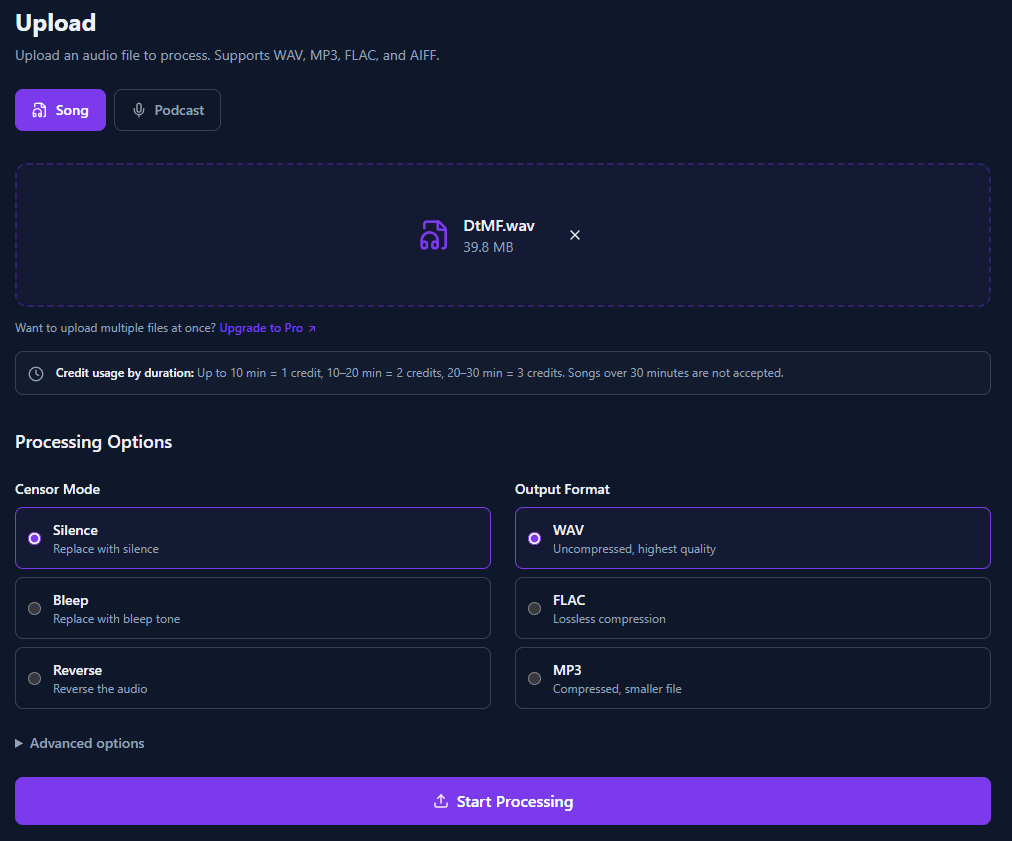
Upload any audio file — WAV, MP3, FLAC, or AIFF. Choose your censor mode and output format.
AI processes it
The AI separates vocals, identifies the song, transcribes lyrics, and flags profanity automatically.
You review every word
Listen to each flagged word in context. Approve words to censor or reject them to keep. You have full control.
Export clean version
Download your clean version, stems, and compliance reports — proof for labels, distributors, and legal.
AI + human review = zero-risk clean edits
Unlike fully automated tools, BleepKit never ships an edit you haven't reviewed. The AI does the heavy lifting, but you make every final decision. Nothing gets censored that shouldn't be, and nothing slips through.
Uploading Songs
Supported formats
WAV, MP3, FLAC, and AIFF files up to 200 MB. Maximum duration is 30 minutes for songs, 3 hours for podcasts.
Credit usage by duration
| Duration | Credits |
|---|---|
| Up to 10 minutes | 1 credit |
| 10 – 20 minutes | 2 credits |
| 20 – 30 minutes | 3 credits |
Censor modes
- Silence — Replaces flagged words with silence. The cleanest option for most use cases.
- Bleep — Replaces flagged words with a standard bleep tone. Common for broadcast radio.
- Reverse — Reverses the audio of flagged words. A creative option that keeps the vocal energy.
Output formats
- WAV — Uncompressed, highest quality. Best for mastering and professional workflows.
- FLAC — Lossless compression. Same quality as WAV but smaller file size.
- MP3 — Compressed. Good for distribution and streaming platforms.
Advanced options
- Loudness normalization — Normalize output to a target LUFS value (default: -14 LUFS).
- Padding — Add extra silence around each censored word (0–200 ms). Helps smooth transitions.
Processing Pipeline
When you upload a song, BleepKit runs through several automated steps. Here is what happens behind the scenes:
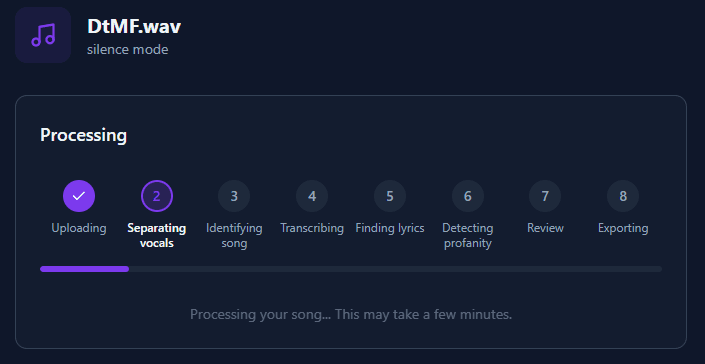
Vocal Separation
AI-powered source separation splits the audio into vocals and instrumental stems with studio-quality precision.
Song Identification
The system attempts to identify the song using audio fingerprinting and metadata analysis. This helps find accurate lyrics.
Lyrics Retrieval
If the song is identified, lyrics are fetched from online databases. Multiple sources are checked for the best match.
Speech-to-Text
The vocal track is transcribed using AI speech recognition, providing word-level timestamps for precise censoring.
Profanity Detection
Transcribed words and retrieved lyrics are cross-referenced against profanity databases to flag explicit content.
Review Preparation
Flagged words are compiled with timestamps and source information, ready for your review.
Reviewing Flagged Words
The review page gives you full control over which words are censored. Every word flagged by the AI can be approved or rejected before export. This is what makes BleepKit zero-risk — you make the final call on every word.
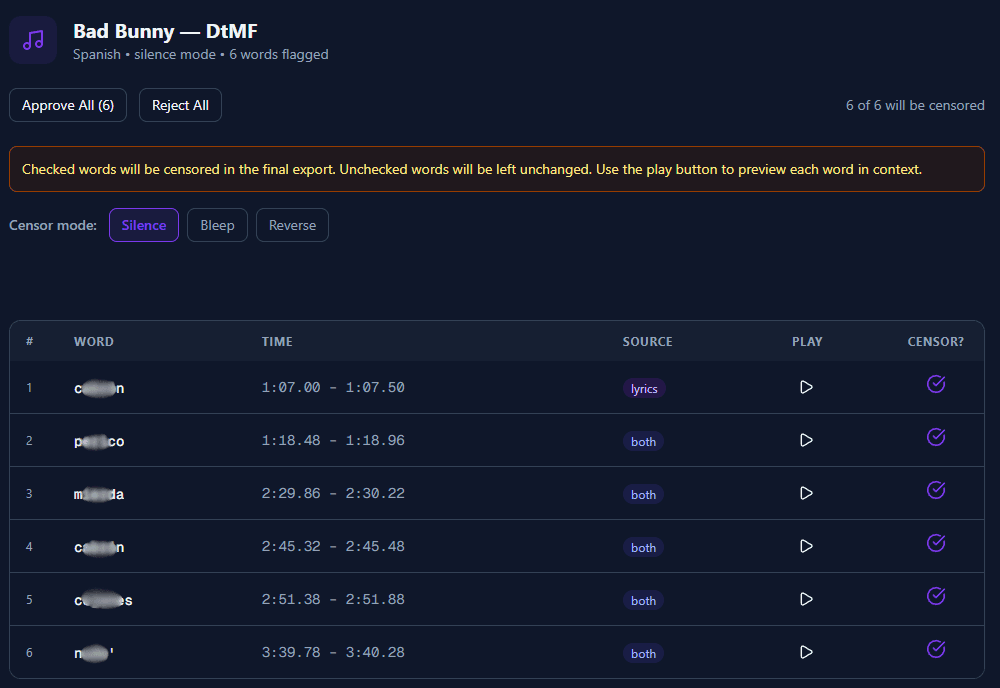
Example: flagged words table
| # | Timestamp | Word | Source | Action |
|---|---|---|---|---|
| 1 | 0:42 – 0:43 | **** | both | Approved |
| 2 | 1:15 – 1:16 | **** | stt | Approved |
| 3 | 2:08 – 2:09 | heck | stt | Rejected |
Each row has a play button to hear the word in context. Approve words to censor them, reject to keep them in the audio.
Bulk actions
Use "Approve All" to censor every flagged word, or "Reject All" to keep them all. Then fine-tune individual words as needed.
Audio playback
Click the play button next to any word to hear a short audio snippet centered on that word. This helps you decide whether to censor it in context.
Source badges
Each flagged word shows where it was detected:
- stt — Detected from speech-to-text transcription
- lyrics — Found in retrieved lyrics
- both — Detected by both transcription and lyrics
- manual — Manually added by you
- custom_list — Matched your custom word list
Censor mode switcher
You can change the censor mode (silence, bleep, or reverse) directly on the review page before exporting. No need to re-upload.
Full transcript
Below the word table, the full transcript shows every word in the song. Already-flagged words are highlighted. Click any unflagged word to add it to the censor list — useful for catching words the AI missed.
Downloads & Exports
After approving your word selections, BleepKit exports your files. Five downloads are available:
Clean Version
The full song with all approved words censored using your chosen censor mode.
Instrumental
The instrumental track with vocals completely removed.
Acapella
The clean vocal track only, with approved words censored.
Compliance Report (TXT)
A plain text report listing every flagged word, timestamps, and your decisions.
Compliance Report (PDF)
A professionally formatted PDF with tables, song metadata, and your complete review decisions.
Re-review & re-export
Changed your mind? Click "Re-Review Words" on the download page to go back and adjust your selections. Re-reviews are free and unlimited — you only pay once per upload.
Compliance Reports
Proof for labels, distributors, and legal
Every processed song generates a compliance report — a detailed record of exactly what was censored, where, and by whom. This is documentation you can hand to a label, distributor, or legal team to prove the edit meets broadcast standards.
TXT Report
Machine-readable plain text with every flagged word, timestamp, detection source, and approval status. Ideal for archiving and automated workflows.
PDF Report
Professionally formatted with BleepKit branding, song metadata, censored word tables, and processing details. Ready to attach to submissions or hand to stakeholders.
Reports include: song/podcast metadata, processing date, censor mode used, total words flagged, individual word timestamps and sources, approval decisions, and output file details.
Settings
Customize BleepKit to match your workflow from the Settings page.
Default preferences
Set your preferred censor mode, output format, content type, and normalization settings. These defaults auto-populate the upload form so you don't have to set them every time.
Custom extra words
Add words that should always be flagged for censoring, even if the AI does not flag them. One word per line. These words will be checked against every song you process.
Custom ignore words
Add words that should never be flagged, even if the AI detects them. Useful for brand names, slang, or context-specific terms that are not actually profanity.
Supported Languages
BleepKit automatically detects the language of your audio and applies language-specific profanity detection. The following languages are currently supported:
Accuracy is highest for major world languages. Less common languages are supported but results may vary. Language is auto-detected during processing.
Credits & Plans
How credits work
Each song you upload costs credits based on its duration. Credits are deducted when processing begins. Re-reviewing and re-exporting a song does not cost additional credits.
Free trial
Every new account gets 60 seconds free — one song preview OR one short podcast/video clip — no credit card required. When you love it, unlock the full track for $2.99, or subscribe for unlimited processing.
Podcasts & Video
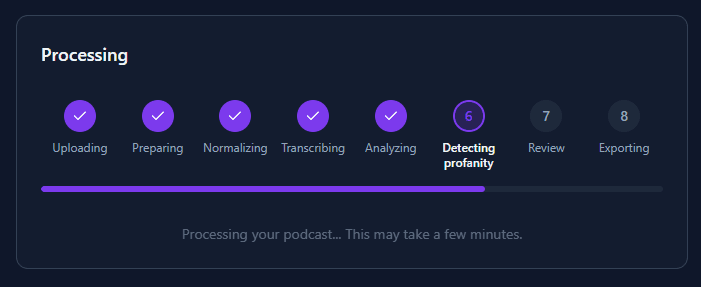
How media cleaning works
Podcast and Video modes use a simplified pipeline optimized for spoken word content. Select “Podcast” or “Video” when uploading to activate this mode. Same AI + human review approach — you approve every word before export.
What's different from songs?
- •No vocal separation — podcasts and videos don't have background instrumentals to remove, so we skip this step entirely.
- •No song identification — no fingerprinting or lyrics lookup. Just straight to transcription.
- •Longer duration — podcasts and videos can be up to 3 hours (vs 30 minutes for songs).
- •Minute-based pricing — uses your media minutes balance instead of song credits. View minute packs.
Video support
Upload MP4, MOV, MKV, or WebM files up to 2 GB. BleepKit extracts the audio, cleans it, and muxes it back into the original video container — your video quality is untouched. Perfect for YouTube creators who need to keep content monetization-safe without re-editing.
Downloads
Podcast exports include the clean audio file and compliance reports (TXT + PDF). Video exports include the clean video file with the censored audio track. Instrumental and acapella stems are not available for media content since there is no vocal separation.
Known Limitations
BleepKit is highly accurate, but no AI system is perfect. Here are scenarios where results may vary:
Heavy background noise
Extremely noisy recordings (low-quality live recordings, heavy distortion) may reduce transcription accuracy. Studio-quality audio produces the best results.
Overlapping vocals
When multiple speakers or singers overlap simultaneously, the AI may miss words or flag incorrect timestamps. This is most common in group choruses or crosstalk in podcasts.
Slang and context ambiguity
Some words have both clean and explicit meanings depending on context. The AI flags conservatively — you can always reject false positives on the review page.
Rare languages
While 30+ languages are supported, accuracy is highest for major world languages. Less common languages or heavy regional accents may produce lower detection rates.
Mumbled or whispered vocals
Very quiet, mumbled, or whispered vocals may not be accurately transcribed. The full transcript on the review page lets you catch anything the AI missed.
Your safety net: Even when the AI isn't perfect, the review step catches everything. You see every flagged word, hear it in context, and make the final decision. That's why we say AI + human review = zero-risk.
Frequently Asked Questions
General
What is BleepKit?
Who is BleepKit for?
How long does processing take?
Quality & Standards
Will this pass Spotify / Apple Music clean edit standards?
Does this sound better than manual edits?
Can I use clean edits for YouTube monetization?
Can I batch process songs?
Accuracy
What if the AI misses a word?
What if the AI flags a word that isn't profanity?
Does it support languages other than English?
Billing
Is the free trial really free?
Do re-reviews cost credits?
What happens if I run out of credits?
Video
What video formats are supported?
Does BleepKit change my video quality?
What if my video has background music?
Can I get subtitles from my video?
Do videos use song credits?
Files & Privacy
Is my audio kept private?
Can I delete my processed files?
How long are my files stored?
Still need help?
Our team is here to help. Reach out and we will get back to you as soon as possible.
hello@bleepkit.com